Measure every endpoint.
Route on the evidence.
Afterburn connects to the inference endpoints you already run, measures them under your own prompts, and sends each request to the one that keeps your latency limit for the least cost.
Fig. 00 · Works with
Your stack. It sits in front and replaces nothing.
Anything that speaks the OpenAI-compatible API can be measured and routed: the engines you serve yourself, the models on a laptop, and hosted providers.
Serving engine. First-token and queue metrics read from /metrics.
Serving engine. Cache hit rate and generation speed read live.
Through its OpenAI-compatible server.
llama-server on a laptop or a box under the desk.
Local models behind the same API as everything else.
Its local server, measured like any other endpoint.
Hundreds of models, prices filled in from its catalogue.
If it speaks the OpenAI format, Afterburn can measure it.
Fig. 01–04 · The loop
One loop. Running all the time, on your own traffic.
Each figure is laid out the way the console shows it, filled with sample data.
Endpoint · vllm-h100
- model
- Llama 3.1 8B Instruct
- first token, p95
- 175 ms
- between tokens, p50
- 11 ms
- output throughput
- 1,240 tok/s
- KV cache in use
- 64%
- errors
- 0 of 200
01Observe
Afterburn measures each endpoint the way your users meet it: time to first token, time between tokens, the whole response and its errors, timed on the stream. Where the engine publishes Prometheus metrics, it reads queue depth and KV-cache use too.
- 1.1First token, between tokens, total, errors
- 1.2Streamed and timed at the gateway
- 1.3Engine metrics where they are published
Policy · chat
- limit
- first token p95 ≤ 300 ms · errors ≤ 1%
- sglang-l40s
- 232 ms · $0.17 / 1M · selected
- vllm-h100
- 175 ms · $0.21 / 1M · qualifies
- ollama-local
- 838 ms · over the limit
02Decide
Set the limit once: first token under a p95, the whole response under a p95, an error budget. Afterburn ranks only the endpoints that keep it, by measured cost per million tokens, and says why the others were turned down.
- 2.1Limits: first-token p95, total p95, errors
- 2.2Ranked by measured cost per 1M tokens
- 2.3A reason for every endpoint turned down
Route · chat
- primary
- sglang-l40s
- fallbacks
- vllm-h100, then hosted
- revision
- r4, from r3
- timeout
- 20 s per attempt
- rollback
- one step
03Route
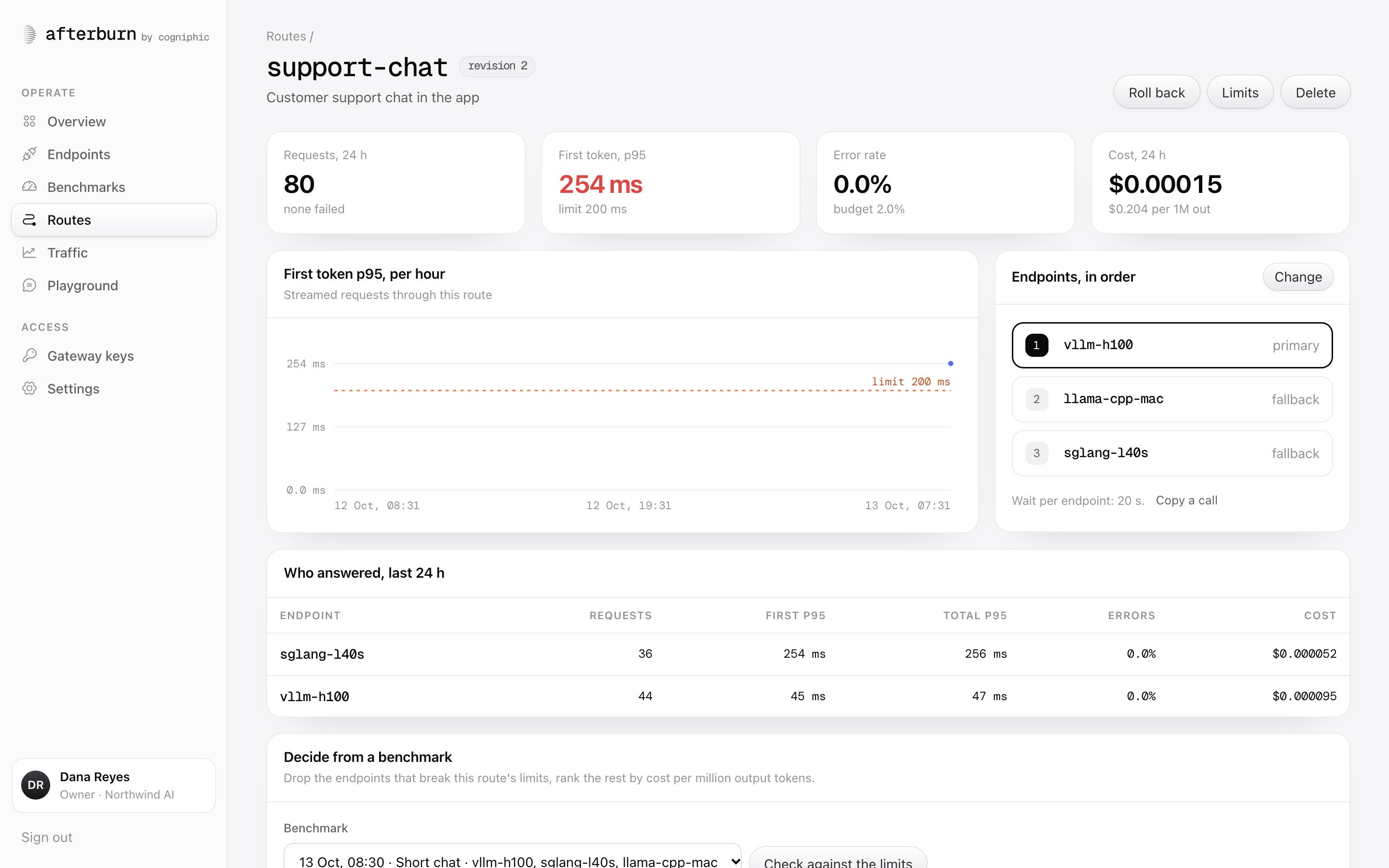
Your apps call one OpenAI-compatible URL and name a route as the model. Each request goes to the route’s primary endpoint and falls through to the next on errors and timeouts. Every change is a revision, and going back is one step.
- 3.1One OpenAI-compatible URL for every app
- 3.2Fallbacks on errors, 5xx, 429 and timeouts
- 3.3Every change a revision; rollback in one step
Change · r3 → r4
- first token, p95
- 208 → 186 ms
- cost per 1M output tokens
- $0.21 → $0.17
- error rate
- 0.2% → 0.1%
- requests compared
- 1 hour each side
04Prove
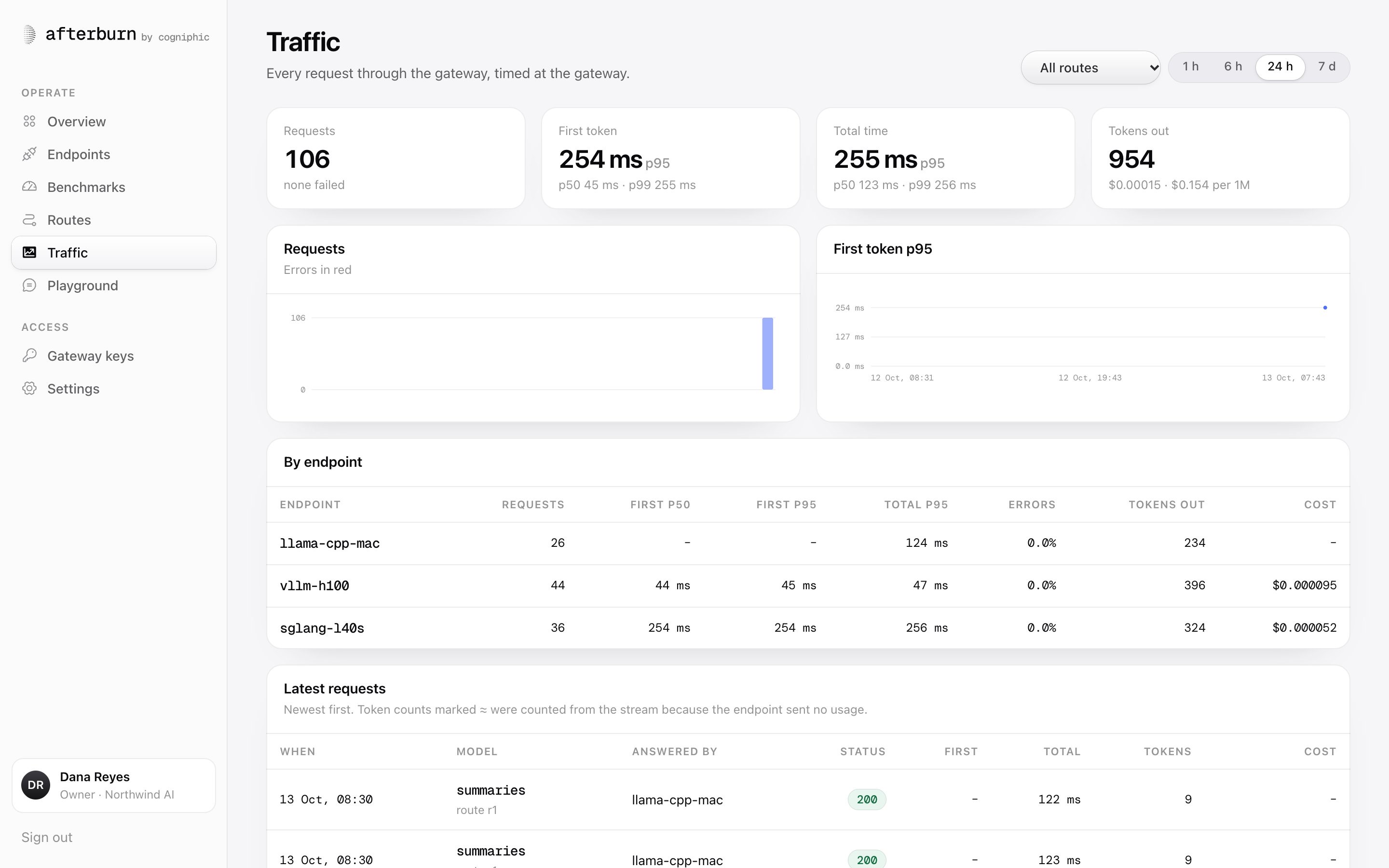
Every request through the gateway is logged with its endpoint, latency, tokens and cost. When a route changes, Afterburn holds the hour before against the hour after, so each decision carries its own receipt.
- 4.1Every request logged with tokens and cost
- 4.2The hour before against the hour after
- 4.3Kept with the revision that caused it
Fig. 05 · The console
The console. Every number from your own requests.
Endpoints, benchmarks, routes, traffic and a playground, on one record. Nothing in it is estimated; it is measured by the requests Afterburn sends or forwards.
afterburn/app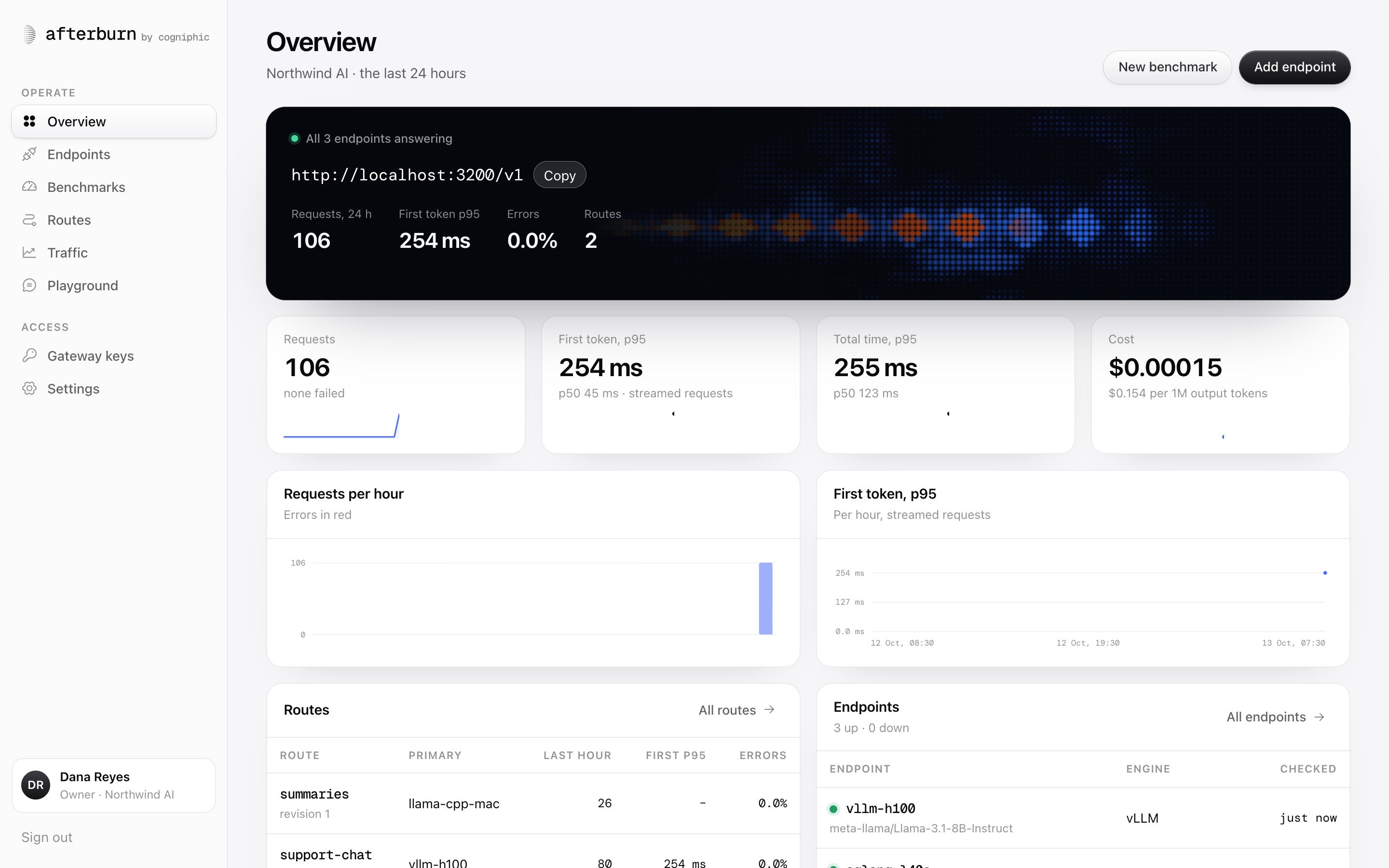
Overview. The gateway, its health and the last day of traffic.Sample data, measured against test engines.
Fig. 06 · Gateway
Gateway. One URL for every app; the route decides the rest.
Point any OpenAI client at Afterburn and name a route instead of a model. When the primary fails, the next endpoint takes the request before anything has been sent back.
base_url = "https://afterburn.your-company.com/v1"model = "support-chat"the only two lines that change
Any OpenAI SDK or HTTP client. Change the base URL and the key; nothing else.
Tokens reach your app as the endpoint makes them. Afterburn times them on the way past.
Connection errors, 5xx responses and timeouts move the request to the next endpoint on the route.
Endpoint, status, first token, total time, tokens and cost, for every call that goes through.
Fig. 07 · Benchmarks
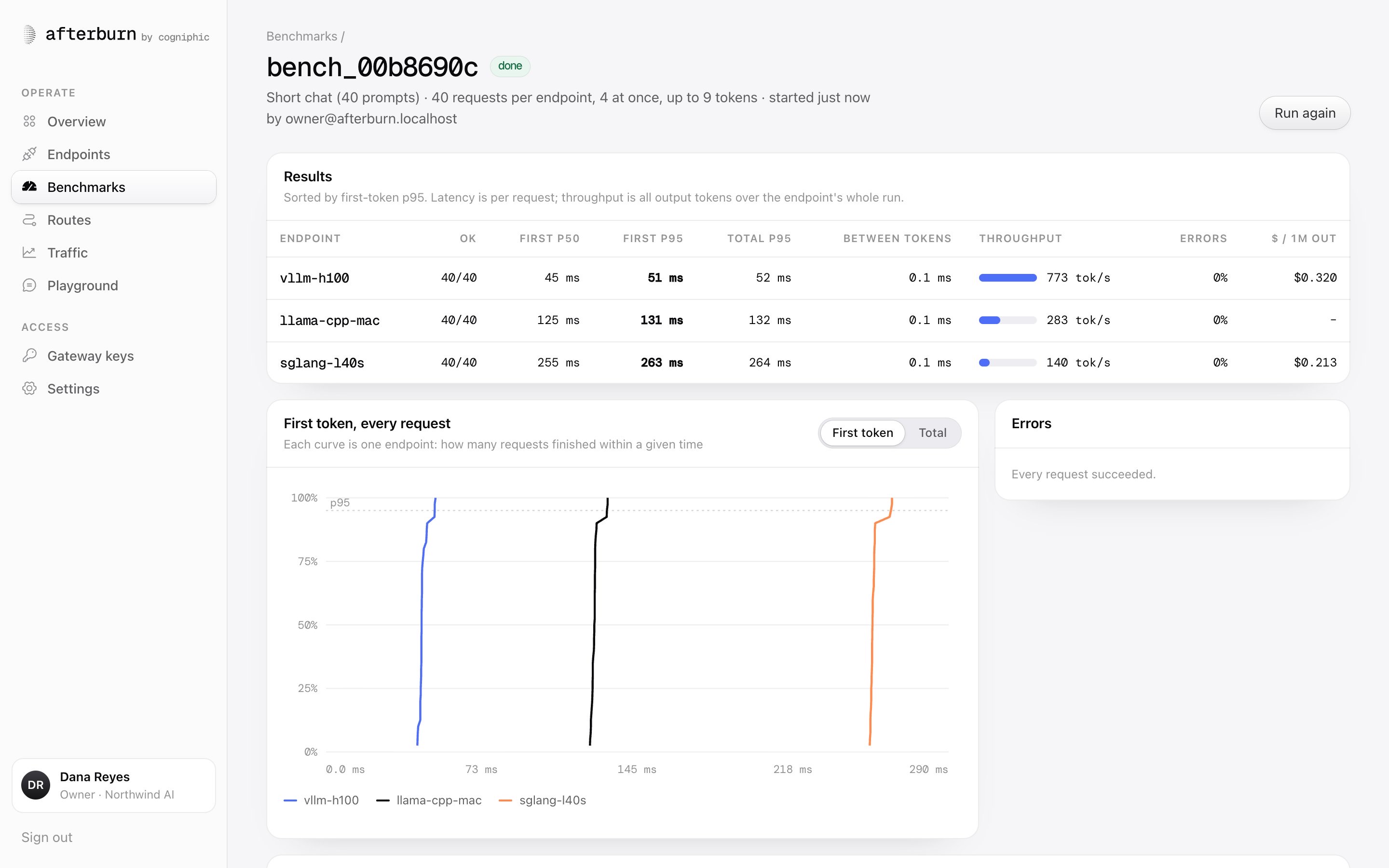
Benchmarks you can rerun, on your own prompts.
A run sends the same prompts to every endpoint at the concurrency you choose, streams every answer and keeps every measurement. Run it again next week and the two sit side by side.
Benchmark run · b-0142Sample data
run b-0142 · prompts chat-short (200) · concurrency 16 · max 256 tokens

endpoint        done      first p95   total p95   tok/s   errors
vllm-h100       200/200   175 ms      1.9 s       1,240   0
sglang-l40s     200/200   232 ms      2.4 s         910   0
ollama-local    196/200   838 ms      7.8 s          64   4

limit  first token p95 ≤ 300 ms · errors ≤ 1%
✓ sglang-l40s   qualifies · $0.17 / 1M output · selected
✓ vllm-h100     qualifies · $0.21 / 1M output
✗ ollama-local  first token p95 838 ms, over the limit

baseline kept · b-0131, seven days earlier
Time to first token, every requestSample data
sglang-l40sp95 232 msvllm-h100p95 175 msollama-localp95 838 ms
Fig. 08 · Evidence
Every change keeps its receipt.
When a route moves, Afterburn compares the traffic before and after on the same measures, and keeps the result with the revision. The history explains itself.
Route chat · revision r4 against r3 · one hour each sideSample data
Fig. 09 · Security
Keys stay sealed. Changes stay on the record.
Provider and engine keys are encrypted at rest. The console only ever shows their last four characters.
Keys for your apps are shown once when made, stored only as hashes, and can be revoked at any time.
Owner, admin, operator, developer, viewer and billing, checked by the API on every change.
Every change records who made it, what it was before and after, and when.
Questions
Does Afterburn replace my serving engine?
What does it need from an endpoint?
Where do the console’s numbers come from?
What happens when an endpoint goes down?
Can I run it on my own machines?
Start with
one endpoint.
Connect it, run a benchmark, and see where your latency really goes.